←2024 → 2026

Design Manager · Nasdaq: NRC

Building the design function at NRC Health

NRC Health helps US hospitals and health systems collect, analyze and act on the experience data of their patients and their employees, through four product suites, a business of about $140 million in annual revenue. When I joined in 2024, there was no design team. Two years later: a team of three, a design system adopted by three of the four suites, four phases shipped on the redesign of the oldest product, and a 24% lift in outreach-email click-through.

SaaS · Healthcare · Patient Experience · Employee Experience · Design to Code · Management · AI · Analytics

The visuals on this page are simplified reproductions, deliberately different from the real products and built with royalty-free elements. They show how the product is used, they are not the actual software, out of respect for intellectual property.


1. Building the team

CTOCPOC-suiteDevelopersDesign ManagerPMsSenior Product DesignerProduct DesignerAnalytics Specialist
01

Name a designer for each suite

Four suites, two product designers. Each suite has a named designer instead of a shared queue, and every product team knows who to go to.

02

Ship quick wins first

A newborn function has no credit. So the first deliveries were small, visible and fast, because that is what earns the right to take on bigger topics later.

03

Pool the cross-product layer

Design system, analytics and front-end are handled as one whole.

Delivered in two years

Design system
Design system adopted by three of the four product suites, and by the AI features
Quick wins
101 listed and prioritized across the products
Product design
Market, Customer and Patient Experience redesigns launched, from tokens to design patterns. Patient Experience: phases 0 to 3 shipped, from quick wins to the filter system
Huey
Three entry points across the suites, three design patterns integrated
Analytics
Amplitude auto-capture in place, A/B testing on design decisions

Why the team stays shared

Product teams call on design the way they call on any other function. The designers are named per suite but belong to one team, and the design system and team cohesion are common responsibilities. That is what keeps the four suites coherent.


2. Three product cases

Three problems of a different nature: redesigning the company's oldest product, lifting conversion on a major data-collection channel, and a strategic call on AI.

Illustrative recreation, not an actual NRC Health product. All screens and data are fictional.

a

Redesigning the Patient Experience suite
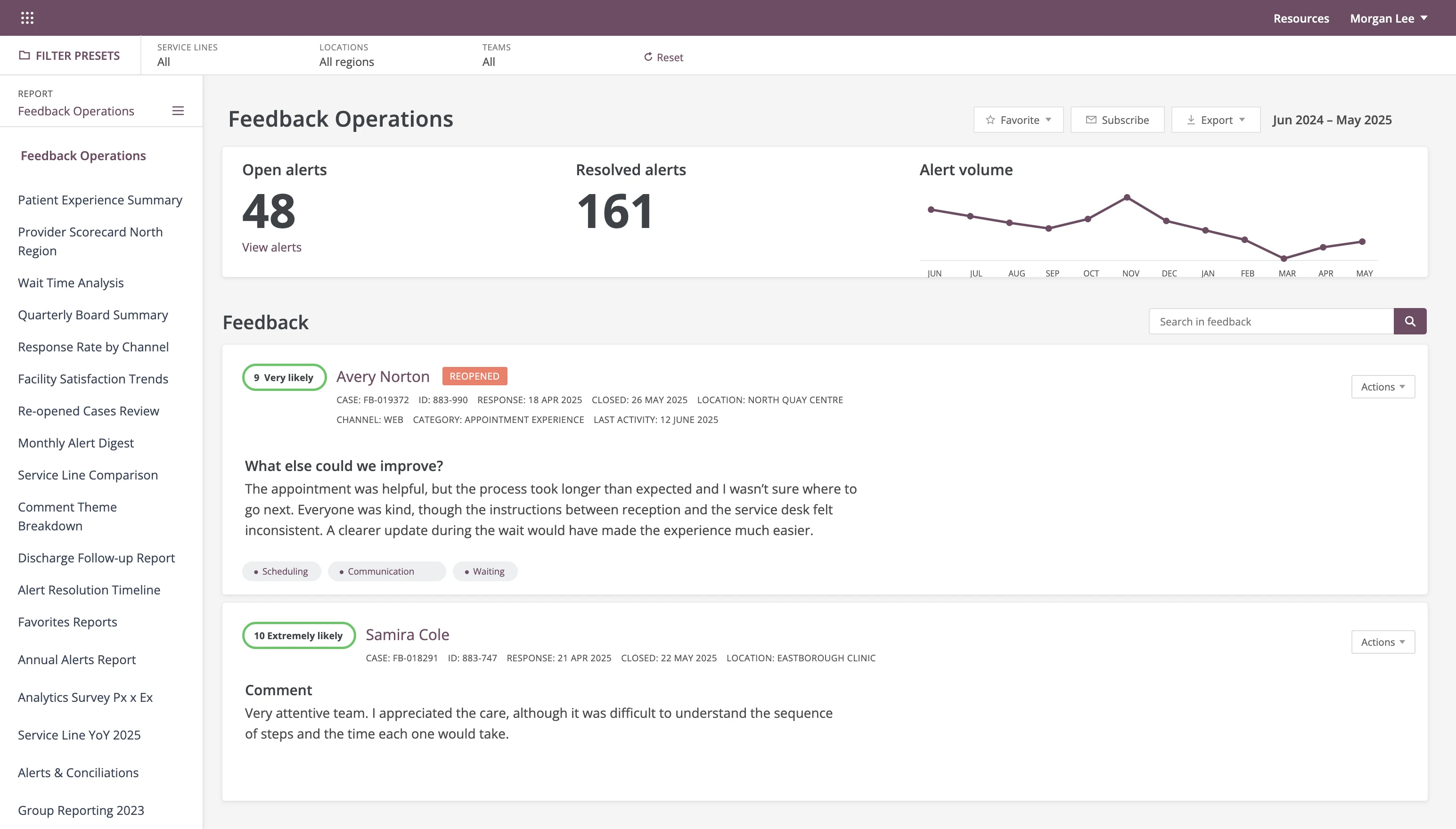
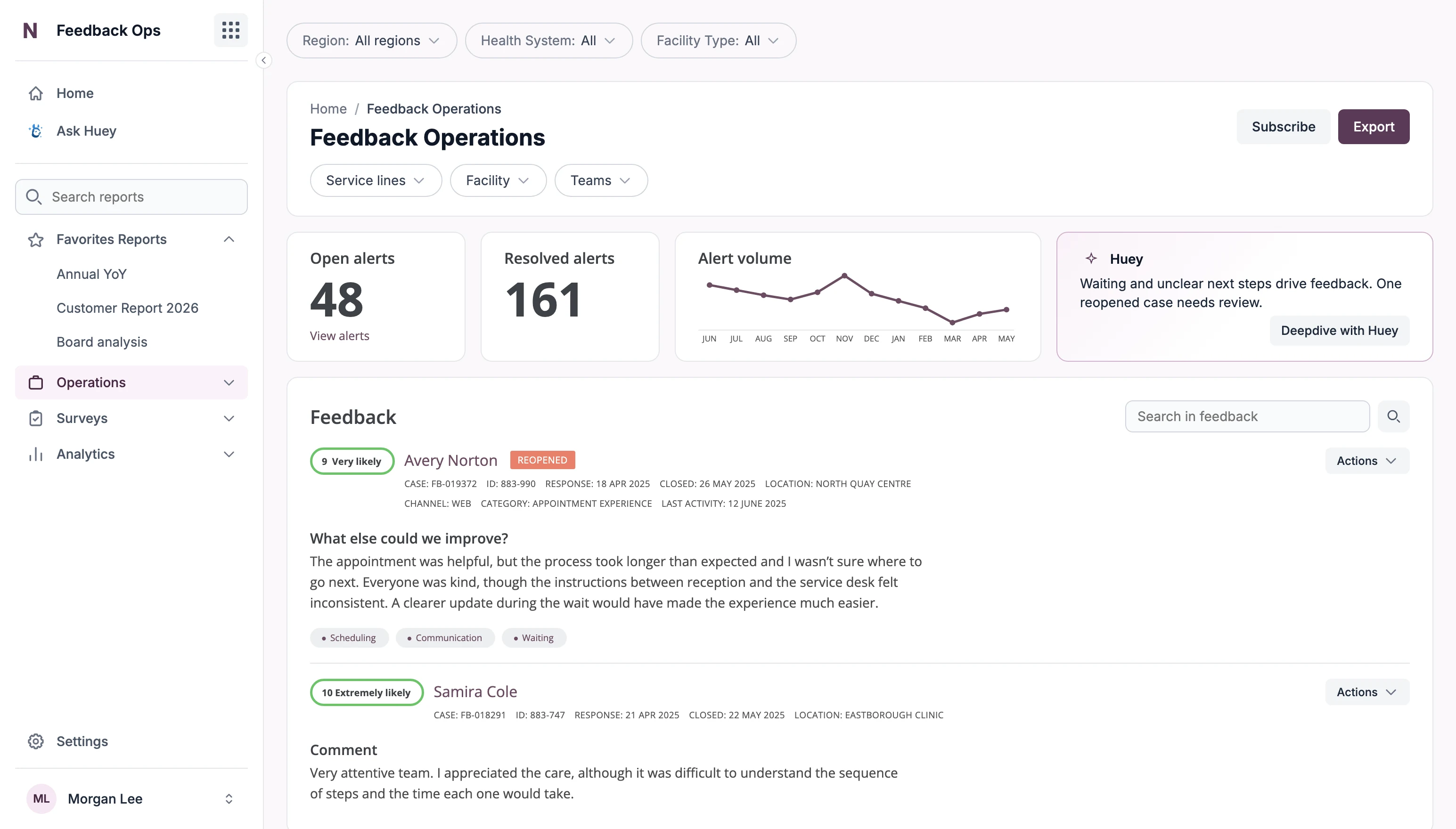
BeforeAfter
BeforeAfter
Feedback Operations, before and after the redesign. Drag to compare.

The oldest product in the portfolio, layered with years of iterations without a sustained product strategy, and weighed down by technical debt. Hospitals rely on it every day, so the redesign could not disrupt any of their workflows.

  • Tackle the suite in phases rather than as one single project, each with its own scope and success criteria.
  • Open each phase with a round of user research, to confirm in finer detail the problems identified upstream.
  • Pair with a dedicated offshore front-end developer squad, which shortens the path from a design decision to production.
  • Keep the product usable at every step, so the work could pause or be reordered without leaving a half-redesigned suite behind.

Status in July 2026: Phase 0 shipped: two quick wins on the legacy screen, favorite reports on top and a report search. Phase 1 shipped: design tokens and primitive components (buttons, input fields). Phase 2 shipped: the navigation bar. Phase 3 shipped: the filter system. Tables and data visualization were next.

01

The audit

The legacy screen with four problems marked
  1. Navigation hierarchy

    Problem. It does not reflect current usage.

    On screen. Endless flat list, Favorites at the end, main pages hidden behind clicks.

  2. One element, three purposes

    Problem. Navigation, filtering and the empty state share one element.

    On screen. Report list, report settings with filters, and an empty panel.

  3. No visual hierarchy

    Problem. Actions and information carry the same weight.

    On screen. No hierarchy between CTAs and information. A mobile pattern, the burger menu, on desktop.

  4. Hidden filtering

    Problem. The filtering system sits behind clicks.

    On screen. Filters are split between the presets bar and the panel.

02

Phase 0, quick wins

The legacy screen with favorite reports on top and a report search
  1. Favorites and most used on top

    Problem. Favorites sat at the end of an endless list (audit 1).

    Solution. Favorite and most used reports are surfaced at the top of the list.

  2. Report search

    Problem. Finding a report meant scrolling the whole list (audit 1).

    Solution. A search field above the list.

03

Phase 1, primitives

The screen with primitive buttons and input fields
  1. Buttons from the design system

    Problem. No shared base: every action looked equally important (audit 3).

    Solution. Primitive buttons. Export is the one filled action, Favorite and Subscribe stay quiet.

  2. Input fields from the design system

    Problem. Controls were styled one by one, with no shared base (audit 3).

    Solution. Primitive input fields: the feedback search shares one height and one style with its button.

04

Phase 2, navbar

The screen with the new sidebar navigation and report search
  1. Navigation, reordered and grouped

    Problem. Endless flat list, Favorites at the end, main pages behind clicks (audit 1, 2).

    Solution. Home and Ask Huey first, reports in four sections with Favorites on top. The panel only navigates.

  2. Report search

    Problem. Even grouped into sections, the report list stays long (audit 1).

    Solution. The search field from phase 0 stays, above the sections.

05

Phase 3, filters

The screen with app-level filters, a header card and bento cards
  1. Two levels of filters

    Problem. Filtering was hidden behind clicks and split across two places (audit 4).

    Solution. App-level filters on the app background, page-level filters in the header card. Scope is visible.

  2. Bento cards

    Problem. CTAs and information had no hierarchy (audit 3).

    Solution. Header, alerts and feedback become separate cards on the app background, each with one job.
b

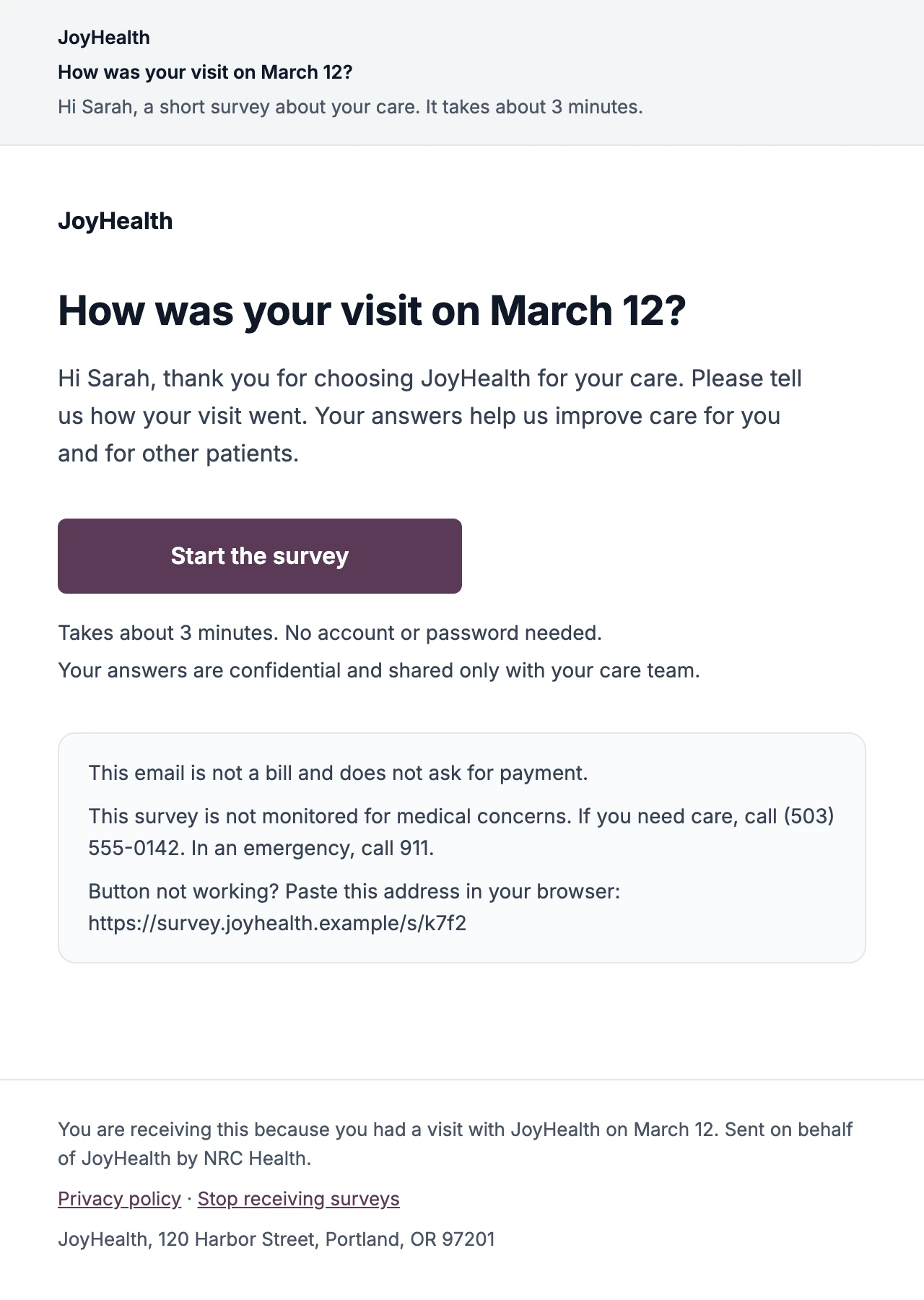
The outreach email

These emails had an 8% click-through rate, which is decent, but the email had no reading hierarchy and no clear main action, so it was easy to mistake for spam.

  • List 101 quick wins across every product, then prioritize them. This one combined a wide reach with a low cost of change.
  • Rebuild the email around a single action, instead of a wall of content.
  • Ship it in part through the design-to-code pipeline, with no spec in between.
  • Present the result to the executive committee, before and after side by side.

Click-through rate from 8% to 9.9% in an A/B test, a 24% lift.

The outreach email, after the redesign
c

Huey, one door for AI

AI features were multiplying across the portfolio, each with its own entry point and its own definition.

  • Bring everything under Huey: a single assistant federating the AI capabilities, extended into smart features and components shared by every suite.
  • Settle on three entry points and no more: an agent to query the data directly, a widget component that pushes information (summaries, insights, next logical actions...), and features embedded in the products where the work already happens (writing assistant, incident handling, ambient listening...).
  • Make the entry point a product decision, rather than a choice revisited from scratch with every feature.

Ambient listening, for example, raised nurse-rounding documentation from 55% to 90% in a three-month test.

The research behind it distilled into three principles every Huey interaction has to pass: inviting, relevant, adaptive. They became an evaluation test, then a marker and a drawer shared by every product.

01

The widget

The screen with the Huey widget next to the alerts and the graph
  1. Huey widget in the stats row

    Principle. Inviting, relevant, adaptive: the three principles every Huey interaction has to pass.

    Solution. One short insight beside the alerts and the graph, and a button into the conversation.

02

The drawer

The screen with the Huey drawer open on the right
  1. Full-height drawer

    Principle. Going deeper should not take the user off the page.

    Solution. Deepdive with Huey opens a drawer docked right that pushes the content.

  2. Answer, insight, next steps

    Principle. A long answer has to be scannable and ratable.

    Solution. Three labelled blocks, with a rating on each answer.

  3. Ask Huey input

    Principle. The conversation continues where the insight appeared.

    Solution. One field to ask a follow-up in natural language, with a send icon.


3. The design system

Four products, several front-end stacks, one design system. It is adopted by three of the four suites and by the AI features.

Build on Flowbite

Rather than rebuilding primitives, add a semantic layer on top, shaped around the company and its needs. There was no time to build a full design team from scratch: an existing library meant fast integration and quick wins that solved identified user problems and proved value early.

Make design tokens stack-agnostic

To cover heterogeneous environments: Angular, React, .NET and legacy code all consume the same tokens.

Share patterns across products

Navigation, filters and the overall page template are common to every product, which eases development on one side, and onboarding and everyday use on the other.

Make Figma and Storybook the shared source of truth

Design and engineering look at the same component at the same time, so a gap between what was designed and what shipped shows at once.

Experiment with AI-assisted code generation

A design-to-code workflow that lets non-technical profiles ship changes consistent with the design system, and generates code ready for developer review.

Flowbite, the open-source base of the system, extracted into tokens and 19 live components.


4. Analytics

Product analytics was built with Product, Engineering and the executive committee, so a design decision could be checked against a number. The outreach email above is the example: one hypothesis, one A/B test, a measured 24% lift.

→

Bring an Analytics Specialist into the design team, so measurement is planned while the feature is designed.

→

Back every design decision with research and A/B testing, so each change ships with a measurable hypothesis.

→

Workshops and hands-on definition of KPIs and North Stars with PMs and the C-suite.